Salesforce Revenue Intelligence for Power BI
Board-ready Salesforce revenue reporting in Power BI.
A production-ready Power BI semantic model for ARR, bookings, pipeline, renewals, GRR, and NRR – customized to your Salesforce definitions by Jenton’s SaaS reporting team.

Launch links
See Jenton Revenue Intelligence in the marketplaces.
Explore the live AppExchange consulting listing, join the Product Hunt discussion, or watch the product walkthrough on YouTube.
Most Salesforce reporting breaks the moment leadership asks a question the default dashboards cannot answer.
ARR does not match finance. Pipeline coverage is calculated three different ways. Renewal rates come from a spreadsheet someone maintains manually. Every board meeting starts with a debate about whose numbers are right. This app gives leadership one trusted model for the metrics that matter.
What’s included
A standardized Power BI starting point for the GTM and financial reporting SaaS leadership teams ask for most often.
ARR movement
New, expansion, contraction, churn, and net new ARR analysis.
Bookings reporting
Bookings by period, segment, and rep with leadership-ready views.
Pipeline coverage
Pipeline creation, coverage ratios, and velocity tracking.
Renewals
Renewal rates and renewal pipeline tracking for forecast visibility.
GRR and NRR
Gross and net revenue retention built into the semantic model.
AI-ready model
Column descriptions and synonyms optimized for natural language querying.
Product preview
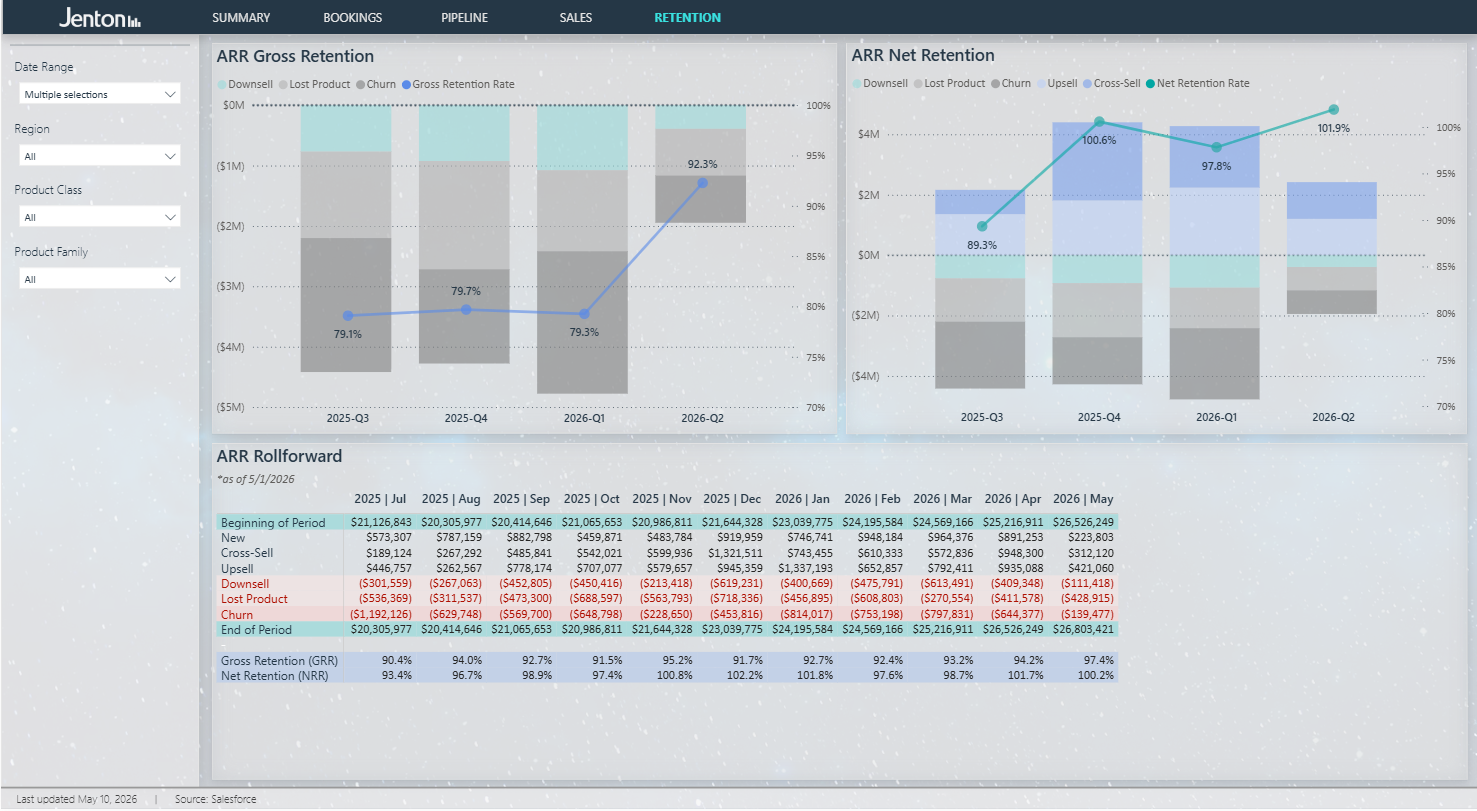
Explore the sample Power BI experience before connecting Salesforce. These preview screenshots show the executive summary, retention analysis, and bookings detail included in the app.


Ask governed revenue questions in Claude
See how Jenton Revenue Intelligence can connect to Claude through an MCP layer, letting teams explore Salesforce-based revenue metrics with natural-language prompts while keeping the Power BI semantic model as the source of truth.
How it works
Install and explore
Install the app for free and explore the included sample data immediately.
Connect Salesforce
Jenton handles field mapping, metric customization, model deployment, and refresh configuration.
Go live fast
Average implementation is 1-2 weeks. Standard implementations with minimal customization are typically delivered within 5 business days.
Built for SaaS leadership teams
Designed for revenue leaders, finance teams, and operations executives at SaaS companies running on Salesforce. Ideal for $20M-$300M ARR companies, especially PE-backed organizations that need board-ready reporting without a six-month implementation cycle.
Pricing
Free app install
Explore the sample data at no cost. When you are ready to connect your Salesforce instance, Jenton delivers the implementation as a fixed-fee engagement.
Why Jenton
Jenton is a Power BI consulting firm specializing in SaaS and PE-backed companies. Our team has built semantic models across the mid-market, unifying Salesforce, financial, and operational data into reporting leadership trusts. This template app packages that expertise into a standardized starting point customized to your Salesforce configuration during implementation.
Frequently asked questions
Common questions about implementation, pricing, technical requirements, security, and the optional Claude AI Query Layer.
About the product6 questions
What is Salesforce Revenue Intelligence for Power BI?
It is a ready-made Power BI report and semantic model built on top of Salesforce. It gives revenue operations and finance teams reliable visibility into the GTM metrics that matter most, including ARR movement, bookings, pipeline, renewals, and retention. Jenton implements it directly into your Power BI environment and handles the configuration.
Who is this built for?
It is designed for VP RevOps, Directors of Revenue Operations, and finance leaders at PE-backed and growth-stage SaaS companies. It is especially useful for teams that need board-ready reporting fast, are tired of reconciling numbers manually before every meeting, or want to make revenue data AI-ready without building a full data architecture from scratch.
What metrics does it cover out of the box?
- ARR movement: new business, expansion, cross-sell, upsell, downsell, lost product, churn, and net ARR with a monthly rollforward table.
- Bookings: new business bookings by period, segment, rep, product type, deal size, and region, plus win rates, average deal size, and year-over-year comparisons.
- Pipeline: pipeline created, weighted pipeline, pipeline set to close by age band, region, and product type, with year-over-year trending.
- Retention: GRR, NRR, ARR rollforward, and retention trend over time.
- Summary: an executive view with KPI cards, ARR waterfall, retention rates, bookings by region, and churn trends.
All metrics are available where supported by your Salesforce configuration. Gaps are identified during scoping.
How is this different from Salesforce built-in reporting?
Salesforce reporting is optimized for pipeline and activity management. It was not built for ARR-based financial reporting. This product adds a governed Power BI semantic layer on top of your Salesforce data, including ARR calculations, NRR, GRR, churn, expansion, waterfall charts, retention trend analysis, and account-level drill-through.
Is this self-service or does it require implementation?
Implementation is required. Jenton configures and deploys the model into your Power BI environment, maps it to your Salesforce field structure, and validates the metrics against your data before handoff. That is what keeps your team from having to debug a generic template.
What makes this AI-ready?
Every measure and column in the semantic model is documented with descriptions and synonyms. That structure helps AI tools understand the business logic behind the numbers instead of only retrieving raw values. For example, a question about NRR decline can be answered using your actual definitions, not a generic approximation.
Implementation & setup7 questions
How long does implementation take?
Standard implementations with minimal Salesforce customization are typically completed within 5 business days. Implementations with heavy custom fields, complex calculations, or custom Salesforce objects may take up to 2 weeks. The final timeline is confirmed after gap analysis and depends partly on how quickly your team can provide field documentation and access.
What do I need to have ready before implementation starts?
- Power BI: Pro or Premium Per User licenses as needed, a dedicated service account with admin permissions, and a designated workspace.
- Salesforce: a dedicated integration account with API access, read permissions on relevant objects, and documentation of custom fields and metric definitions.
- Claude AI Query Layer add-on only: an active Azure subscription and a Claude for Work Team or Enterprise account.
Jenton provides a structured template to collect field documentation during the first step.
What happens during implementation?
- Discovery and field mapping: Jenton sends a template to document Salesforce custom fields and metric definitions.
- Gap analysis and scoping: Jenton reviews your setup against the standard template and confirms required customizations.
- Build and publish: Jenton builds the customized semantic model, publishes it to your Power BI workspace, configures scheduled refresh, and performs QA.
- Review and handoff: a live walkthrough confirms the metrics and includes minor adjustments before close-out.
Do you need access to our Salesforce data?
Yes. Jenton requires a dedicated Salesforce integration account with API read access to build and validate the semantic model. Credentials are used only to deliver the services described in the engagement. If your Salesforce org uses a managed package that must be queried through the API, such as Gainsight or Clari, the integration account may also need access to that package.
Will my existing Power BI environment be affected?
No. Jenton publishes the product to a designated workspace that is separate from any existing Power BI workspaces your team uses. Nothing in your current environment is modified.
What if our Salesforce setup is heavily customized?
Heavily customized Salesforce instances are common and supported. They require more scoping upfront. During gap analysis, Jenton identifies all fields and calculations that differ from the standard template and provides a written summary before build work begins.
Can you add data sources beyond Salesforce?
The base product is built on Salesforce. Additional sources such as HubSpot, Marketo, Stripe, product databases, or a data warehouse can be quoted as a custom engagement. Jenton also supports broader multi-source data architecture using tools like Snowflake and dbt.
Pricing & maintenance5 questions
How is the product priced?
The app install is free. Standard implementation starts at $3,000 and includes discovery, field mapping, customization, deployment, and a live handoff session. Complex implementations are quoted after scoping if the Salesforce configuration requires significant customization. Optional monthly maintenance plans are available for refresh monitoring, metric updates, and support.
What does the monthly maintenance plan cover?
- Monitoring and resolution of scheduled data refresh failures.
- Minor edits to existing report pages, including layout, filter, or visual changes.
- Up to 3 Salesforce field-change requests per month, where each request covers a single field addition or modification to an existing metric.
- MCP server updates as Claude or Power BI APIs evolve, if the AI Query Layer is included in your plan.
New report pages, additional data sources, and major metric restructuring are scoped separately.
Is the implementation fee a one-time cost?
Yes. The implementation fee is charged once at the start of the engagement. Ongoing costs are the monthly maintenance fee and any out-of-scope change requests.
What happens if I do not take the maintenance plan?
The dashboards continue to function as implemented, but Jenton will not proactively monitor refresh failures, apply updates for Salesforce field changes, or maintain the Claude MCP connection. Future changes can be handled as scoped hourly work.
What are change fees and when do they apply?
Change fees apply to work outside the monthly maintenance plan, such as adding a new report page, incorporating a new data source, restructuring a metric definition, or building a new calculation from scratch. Changes are scoped and confirmed before work begins.
Technical requirements6 questions
What Power BI license do I need?
For the base dashboards, Power BI Pro is usually sufficient for users who access reports. If you add the Claude AI Query Layer, the Power BI workspace must be on Premium Per User or higher capacity because the API used by the MCP server requires it.
Does my Salesforce edition need API access?
Yes. API access must be enabled on your Salesforce edition. Salesforce Professional edition and above typically include API access. If your current plan does not include API access, it must be enabled before implementation can begin.
What Azure services are needed for the Claude AI Query Layer?
- Azure Container Apps: hosts the MCP server.
- Azure Container Registry: stores the MCP server container image.
- Azure Key Vault: stores credentials securely.
- Microsoft Entra app registration: authenticates the MCP server with Power BI.
Jenton deploys and configures these Azure components during setup.
Do I need to manage the MCP server after setup?
No. Jenton deploys and manages the MCP server as part of implementation and ongoing maintenance. Your team provides access to the Azure subscription during setup; day-to-day management is handled by Jenton under the maintenance plan.
What Claude plan do I need for the AI Query Layer?
Claude for Work, Team or Enterprise, is required. The MCP server integration is not available on free or individual Pro Claude plans.
Will this work with our existing Microsoft 365 environment?
Yes. The product integrates with your existing Microsoft tenant and Power BI environment. No new Microsoft infrastructure is required beyond the Power BI licenses and workspace described above.
Data, security & privacy5 questions
Who can see our data?
Your data lives in your own Power BI workspace and is accessed by Jenton only through the dedicated service account and Salesforce integration account provided during implementation. Access is limited to authorized Jenton personnel delivering your services.
Does Jenton retain our data?
No. Jenton accesses Salesforce data transiently during implementation to build, configure, and validate the semantic model. Jenton does not retain copies of your underlying Salesforce data after implementation is complete.
How are credentials stored?
Credentials are stored securely with access limited to authorized Jenton personnel. For MCP deployments, credentials are stored in Azure Key Vault within your own Azure subscription and injected as environment variables at deploy time.
Is there a formal security review process for enterprise buyers?
Jenton can provide a summary of data handling practices and security controls upon request. For enterprise or PE-portfolio company buyers with formal review requirements, contact info@jentonbi.com before implementation begins.
Does this comply with data privacy regulations like GDPR or CCPA?
The product is a reporting layer that reads from your own Salesforce instance. Jenton does not store personal data beyond business contact information used to deliver services. Your organization remains the data controller for personal data in Salesforce. For specific compliance questions, consult your legal team and review the Jenton privacy policy.
Claude AI Query Layer5 questions
What is the Claude AI Query Layer?
It is an optional add-on that connects Claude directly to your Power BI semantic model through a Model Context Protocol server. Once configured, you can ask plain-English questions about revenue data and receive answers that reflect your actual business logic.
What kinds of questions can I ask?
- Give me a summary of ending ARR, bookings, and renewal rate.
- How has net revenue retention trended over the last four quarters?
- Which region has the weakest gross retention and what is driving it?
- What is the difference between churn and lost product this quarter?
- How much pipeline set to close is more than 4 months old?
- How should I summarize revenue performance for a board meeting?
The quality of answers depends on the quality of the underlying Salesforce data.
How accurate are AI-generated answers?
The AI Query Layer queries your actual semantic model, the same model that powers the dashboards. That said, AI-generated query results should still be reviewed before being used for decision-making, especially for material financial or board-level outputs.
Does the AI have access to all of our data?
Claude queries the Power BI semantic model, not raw Salesforce data directly. The MCP server authenticates using a service principal in your Azure tenant. Row-level security per individual user is not included in the standard implementation but can be discussed for enterprise deployments.
Can multiple people on my team use the AI Query Layer?
Yes. Anyone with access to your Claude for Work account and MCP server configuration can use the AI Query Layer. The standard implementation uses a single service principal identity for all queries. Per-user identity and row-level security enforcement are available as custom configurations.
Support & updates6 questions
What support is included after implementation?
Clients on the monthly maintenance plan receive proactive data refresh monitoring, up to 3 field-change requests per month, minor report edits, and MCP server maintenance where applicable. For other support requests, contact info@jentonbi.com.
What happens when Salesforce changes a field or we change a metric definition?
Minor Salesforce field changes that affect existing metrics are covered under the monthly maintenance plan, up to 3 per month. Larger metric definition changes are scoped as a change request and confirmed before work begins.
What happens when Power BI or Claude release updates?
Jenton monitors relevant Power BI and Claude API changes as part of the maintenance plan. If an update affects the product, Jenton pushes a fix under the maintenance plan.
Can we update the product ourselves?
The semantic model and report are published to your Power BI workspace, so your Power BI administrators can technically modify them. Jenton recommends routing changes through the maintenance plan or a scoped change request so core metric calculations and AI connections stay reliable.
How do we request changes or new features?
Contact Jenton at info@jentonbi.com. Minor changes within the maintenance plan are handled normally. Changes outside scope are discussed, scoped, and confirmed before work begins.
How do we contact Jenton for support?
Email info@jentonbi.com or use the contact page at jentonbi.com/contact-jenton-bi.
Ready to connect your Salesforce instance?
Install the app, explore the sample data, and contact info@jentonbi.com when you are ready. We will have you up and running within two weeks.
